> For the complete documentation index, see [llms.txt](https://docs.n2ws.com/user-guide/llms.txt). Markdown versions of documentation pages are available by appending `.md` to page URLs; this page is available as [Markdown](https://docs.n2ws.com/user-guide/23-capturing-and-cloning-in-vpc-environments-1.md).
# 24 Capturing and Cloning in VNet Environments with Azure
{% hint style="info" %}
The capturing and cloning of VNet environments are not available with the Free edition of N2W.
{% endhint %}
## 24.1 Overview of VNet and N2W
VNet is an Azure service that allows the definition of virtual networks in the Azure cloud. Users can define VNets with a network range, define subnets under them, security groups, Internet Gateways, VPN connections, and more. One of the resources of the VNet service is also called ‘VNet’, which is the actual virtual, isolated network.
N2W can capture the VNet and Transit Gateway settings as root resources, including their related resources of user environments and clone those settings back to Azure:
* In the same location and account, for example, if the original settings were lost.
* To another location and/or account, such as in DR scenarios.
* With VNet resource properties modified in template uploaded with ARM (Azure Resource Manager), if required.
## 24.2 Prerequisites and Limitations
**Prerequisites:**
* **Enable Network Entity Capture** must be enabled for the Azure account.
* **Capture Network Environments** must be enabled in the **General Settings**.
{% hint style="warning" %} **Limitations:**
* The clone destination location should have sufficient quotas to hold all resources captured in the source location.
**Shared Resource Limitations:**
* The following shared resources are *not* supported for cloning:
* Shared Prefix lists
* Shared Subnets
{% endhint %}
## 24.3 Features of Capturing and Cloning VNet Environments
The objective of Capture and Clone is to provide the ability to protect the root entities of VNet environment types from disaster, by saving their configurations and allowing for recovery in any location.
* Backed up **VNet** entities include:
* VNet resource configuration
* Subnets - VNet tries to match AZs with similar names and spread subnets in destinations in the same way as in source locations.
* Security groups
* DHCP Options Sets - Not supporting multi-name in domain server name.
* Route tables - Not supporting rules with entities that are specific to the source location.
* Network ACLs
* Internet Gateways
* Egress-Only Internet Gateways
* VPN Gateways
* Customer Gateways
* VPN Connections
* NAT Gateways
* VNet Peering connections – Not supporting peer on a different Azure account
* Managed Prefix Lists
{% hint style="info" %}
The **Capture Log** in the **Capture Network Environments** tab of **General Settings** reports the capture status of entities: captured, not captured, or only partially captured.
{% endhint %}
* VNet environment capturing:
* Accounts are enabled for VNet environment configuration capturing by default, but this setting can be disabled as needed.
* Captures in all locations of interest, excluding the unsupported locations.
* N2W will capture and save all changes made on Azure for a user’s VNets.
* Not supported: Carrier gateways, Network interfaces related to VNets, Elastic IP addresses, VNet Endpoints, VNet Endpoints services, Firewalls, and Traffic Mirroring.Transit Gateway resource configuration
## 24.4 Updating Accounts for Capturing VNet Environments
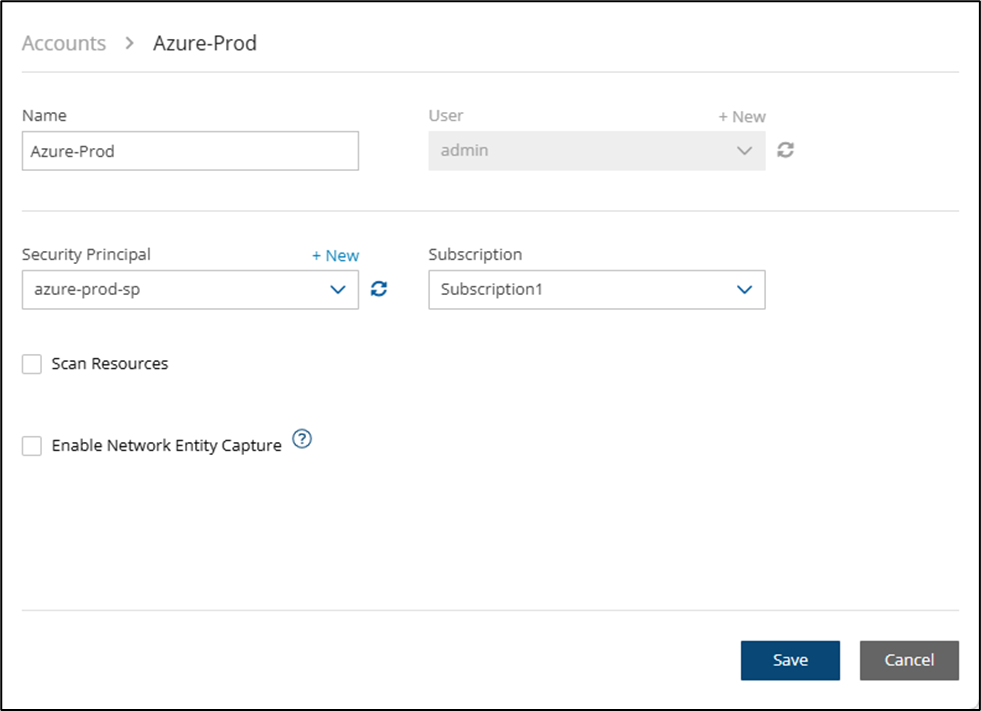
By default, accounts are enabled to capture VNet environment configurations. Configuration data is automatically captured for all enabled accounts according to the interval configured in the **General Settings**. To not capture VNet environments for an account, disable the feature in the account.
**To disable, or enable, an individual account for capturing network entities:**
1. In the main navigation menu, select **Accounts**, and then select an Azure account.
2. Select **Edit**.
3. To disable capturing the network entities of the account, clear **Enable Network Entity Capture** and select **Save.**
4. To enable, perform the following:
1. Select **Enable Network Entity Capture.**
2. Select the relevant network locations.
3. Select **Save**.
5. The network entities will be captured at the intervals defined in the **Capture Network Environment** tab of **General Settings**. To capture immediately, select **Capture Now** in the **Capture Network Environment** tab, as described in the next section.
## 24.5 Configuring Capture of Network Environment Entities
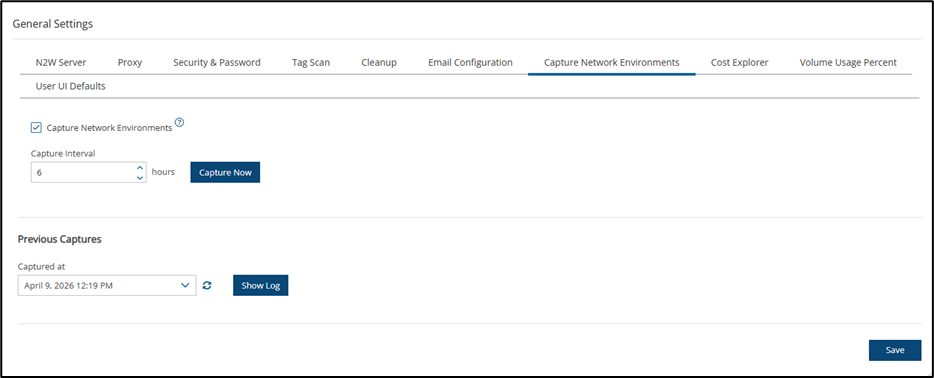
The root user can:
* Enable or disable automatic capture of network environment entities for accounts with the feature enabled.
* Schedule automatic capture interval.
* Initiate an ad hoc capture by selecting **Capture Now** for all accounts with this feature enabled, even if **Capture Network Environments** is disabled in **General Settings**.
* View the last network environment entities captured in the different locations and accounts in **Show Log.**
1. Select **Server Settings** > **General Settings**.
2. In the **Capture Network Environments** tab, select **Capture Network Environments** to enable the feature.
3. To change the capture frequency from the default, select a new interval from the **Capture Interval** list.
4. Select **Save** to update N2W.
5. To initiate an immediate capture for all network environment enabled accounts, regardless of server settings, select **Capture Now.**
## 24.6 Cloning VNet Environments
Cloning VNet environment entities includes the following features:
* Both cross-location and cross-account cloning are supported for VNets.
* The target clone can have a new name. The name will automatically include ‘Clone of ’ at the beginning.
### 24.6.1 Cloning VNets
**Prerequisites, Conditions, and Limitations**
* Before cloning, verify that the destination location has sufficient quotas for all resources captured in the source location.
* Verify that you select the location where the VNet is defined.
Cloning VNets includes the following features:
* The target clone can have a new name. The name will automatically include ‘Clone of’ at the beginning.
* During instance recovery and DR, clones may be optionally created to replicate a particular VNet environment before the actual instance recovery proceeds. The new instance will have the environment of the cloned VNet and will subsequently appear at the top of the target location and account list. A typical scenario might be to capture the VNet, clone the VNet for the first instance, and then apply the cloned VNet to additional instances in the location/account.
* Instances recovered into a cloned VNet destination environment will also have new default entities, such as the VNet’s subnet definition and 1 or more security groups attached to the instance, regardless of the original default entities. Security groups can be changed during recovery.
### 24.6.2 Cloning using N2W and Manual Cloning
When cloning VNet environment entities to an Azure account, N2W generates a JSON template for use with ARM (Azure Resource Manager). N2W supports ARM templates generated up to 4 MB.
**To clone captured VNets:**
1. Select the **Accounts** tab and then select an Azure account.
2. Select **Clone Network Entities**.
3. In the **Clone** **Source** section, perform the following:
1. In the **Location** drop-down list, select the source location of the capture to clone.
2. In the **Resource Group** drop-down list, select the source resource group of the capture to clone.
3. In the **Source VNet** drop-down list, select the item to clone.
4. In the **Captured at** drop-down list, select the date and time of the capture to clone.
4. In the **Clone Destination** section, perform the following:
1. In the **Account** drop-down list, select the account in which to create the clone.
2. In the **Location** drop-down list, select the location to create the clone.
3. In the **Resource Group** drop-down list, select the resource group to create the clone.
4. In the **VNet** Name, a suggested name for the cloned item is shown. Enter a new name, if needed.
5. Select **Clone VNet**. At the end of the cloning, a status message will appear in a box:
* Cloning VNet completed successfully. There may be an informational message that you may need to make manual changes. Check the log, using **Download Log,** for further information.
6. To view the results of the clone network entity action, select **Download** **Log**.
When cloning VNets with resources not supported by N2W, you can download the ARM template for the cloned entity, add or modify resource information, and upload the modified template to the Azure ARM service manually.
**To create a clone manually with ARM:**
1. In the **Account** **Clone VNet** **Entities** screen, complete the fields as described above.
2. Select **VNet ARM Template** to download the ARM JSON template.
3. Modify the template, as required. See the example in section [24.6.3](#id-23-5-1-example-of-cloudformation-template).
4. Manually upload the modified template with ARM.
### 24.6.3 ARM Template Example
```
{"$schema": "https://schema.management.azure.com/schemas/2019-04-01/deploymentTemplate.json#",
"contentVersion": "1.0.0.0",
"parameters": {
"location": {"type": "string",
"defaultValue": "eastus"},
"virtualNetworks_vnet_name": {"type": "string",
"defaultValue": "Clone-of-vnet-1"},
"rtb_name1": {"type": "string",
"defaultValue": "rtbtesting2"}},
"resources": [{"type": "Microsoft.Network/virtualNetworks",
"apiVersion": "2023-05-01",
"name": "[parameters('virtualNetworks_vnet_name')]",
"location": "[parameters('location')]",
"properties": {
"addressSpace": {
"addressPrefixes": ["10.0.0.0/16"]},
"dhcpOptions": {"dnsServers": []},
"subnets": [{"name": "AzureFirewallSubnet",
"properties": {
"serviceEndpoints": [],
"sharingScope": null,
"delegations": [],
"privateEndpointNetworkPolicies": "Disabled",
"privateLinkServiceNetworkPolicies": "Enabled",
"addressPrefix": "10.0.1.64/26"}},
{"name": "AzureBastionSubnet",
"properties": {
"serviceEndpoints": [],
"sharingScope": null,
"delegations": [],
"privateEndpointNetworkPolicies": "Disabled",
"privateLinkServiceNetworkPolicies": "Enabled",
"addressPrefix": "10.0.1.0/26"}},{
"name": "subnet-1",
"properties": {"serviceEndpoints": [],
"sharingScope": null,
"delegations": [],
"privateEndpointNetworkPolicies": "Disabled",
"privateLinkServiceNetworkPolicies": "Enabled",
"addressPrefix": "10.0.0.0/24",
"routeTable": {
"id": "[resourceId('Microsoft.Network/routeTables', parameters('rtb_name1'))]"
}}}]},
"tags": {"HelloTag": "HeyValue",
"hello2tag": "hy2tag"}},
{"type": "Microsoft.Network/routeTables",
"apiVersion": "2023-05-01",
"name": "[parameters('rtb_name1')]",
"location": "[parameters('location')]",
"properties": {"disableBgpRoutePropagation": false,
"routes": [{"name": "hello1",
"properties": {"addressPrefix": "10.0.0.0/24",
"nextHopIpAddress": "",
"nextHopType": "VirtualNetworkGateway"},
"type": "Microsoft.Network/routeTables/routes"},
{"name": "hello2",
"properties": {"addressPrefix": "ApiManagement.BrazilSouth",
"nextHopIpAddress": "",
"nextHopType": "VnetLocal"},
"type": "Microsoft.Network/routeTables/routes"}]},
"tags": {}}]}
```
---
# Agent Instructions
This documentation is published with GitBook. GitBook is the documentation platform designed so that both humans and AI agents can read, navigate, and reason over technical content effectively. Learn more at gitbook.com.
## Querying This Documentation
If you need additional information that is not directly available in this page, you can query the documentation by asking a question.
Perform an HTTP GET request on the following URL with the `ask` and `goal` query parameters:
```
GET https://docs.n2ws.com/user-guide/23-capturing-and-cloning-in-vpc-environments-1.md?ask=&goal=
```
`ask` is the immediate question: it should be specific, self-contained, and written in natural language.
`goal` is what the user is ultimately trying to achieve, the reason they need the answer. Sharing it helps GitBook give you a better, more relevant answer. A goal is most helpful when it describes the outcome the user wants rather than restating the question. For example, with `ask=how do I create an API token`, a goal like `automate deployments from our CI pipeline` lets GitBook tailor the answer to that use case.
The response will contain a direct answer to the question and relevant excerpts and sources from the documentation.
Use this mechanism when the answer is not explicitly present in the current page, you need clarification or additional context, or you want to retrieve related documentation sections.
 **Edit**.
3. To disable capturing the network entities of the account, clear **Enable Network Entity Capture** and select **Save.**
4. To enable, perform the following:
1. Select **Enable Network Entity Capture.**
2. Select the relevant network locations.
3. Select **Save**.
5. The network entities will be captured at the intervals defined in the **Capture Network Environment** tab of **General Settings**. To capture immediately, select **Capture Now** in the **Capture Network Environment** tab, as described in the next section.
## 24.5 Configuring Capture of Network Environment Entities
The root user can:
* Enable or disable automatic capture of network environment entities for accounts with the feature enabled.
* Schedule automatic capture interval.
* Initiate an ad hoc capture by selecting **Capture Now** for all accounts with this feature enabled, even if **Capture Network Environments** is disabled in **General Settings**.
* View the last network environment entities captured in the different locations and accounts in **Show Log.**
**Edit**.
3. To disable capturing the network entities of the account, clear **Enable Network Entity Capture** and select **Save.**
4. To enable, perform the following:
1. Select **Enable Network Entity Capture.**
2. Select the relevant network locations.
3. Select **Save**.
5. The network entities will be captured at the intervals defined in the **Capture Network Environment** tab of **General Settings**. To capture immediately, select **Capture Now** in the **Capture Network Environment** tab, as described in the next section.
## 24.5 Configuring Capture of Network Environment Entities
The root user can:
* Enable or disable automatic capture of network environment entities for accounts with the feature enabled.
* Schedule automatic capture interval.
* Initiate an ad hoc capture by selecting **Capture Now** for all accounts with this feature enabled, even if **Capture Network Environments** is disabled in **General Settings**.
* View the last network environment entities captured in the different locations and accounts in **Show Log.**
 **Server Settings** > **General Settings**.
2. In the **Capture Network Environments** tab, select **Capture Network Environments** to enable the feature.
3. To change the capture frequency from the default, select a new interval from the **Capture Interval** list.
4. Select **Save** to update N2W.
5. To initiate an immediate capture for all network environment enabled accounts, regardless of server settings, select **Capture Now.**
## 24.6 Cloning VNet Environments
Cloning VNet environment entities includes the following features:
* Both cross-location and cross-account cloning are supported for VNets.
* The target clone can have a new name. The name will automatically include ‘Clone of ’ at the beginning.
### 24.6.1 Cloning VNets
**Prerequisites, Conditions, and Limitations**
* Before cloning, verify that the destination location has sufficient quotas for all resources captured in the source location.
* Verify that you select the location where the VNet is defined.
Cloning VNets includes the following features:
* The target clone can have a new name. The name will automatically include ‘Clone of’ at the beginning.
* During instance recovery and DR, clones may be optionally created to replicate a particular VNet environment before the actual instance recovery proceeds. The new instance will have the environment of the cloned VNet and will subsequently appear at the top of the target location and account list. A typical scenario might be to capture the VNet, clone the VNet for the first instance, and then apply the cloned VNet to additional instances in the location/account.
* Instances recovered into a cloned VNet destination environment will also have new default entities, such as the VNet’s subnet definition and 1 or more security groups attached to the instance, regardless of the original default entities. Security groups can be changed during recovery.
### 24.6.2 Cloning using N2W and Manual Cloning
When cloning VNet environment entities to an Azure account, N2W generates a JSON template for use with ARM (Azure Resource Manager). N2W supports ARM templates generated up to 4 MB.
**To clone captured VNets:**
1. Select the **Accounts** tab and then select an Azure account.
2. Select
**Server Settings** > **General Settings**.
2. In the **Capture Network Environments** tab, select **Capture Network Environments** to enable the feature.
3. To change the capture frequency from the default, select a new interval from the **Capture Interval** list.
4. Select **Save** to update N2W.
5. To initiate an immediate capture for all network environment enabled accounts, regardless of server settings, select **Capture Now.**
## 24.6 Cloning VNet Environments
Cloning VNet environment entities includes the following features:
* Both cross-location and cross-account cloning are supported for VNets.
* The target clone can have a new name. The name will automatically include ‘Clone of ’ at the beginning.
### 24.6.1 Cloning VNets
**Prerequisites, Conditions, and Limitations**
* Before cloning, verify that the destination location has sufficient quotas for all resources captured in the source location.
* Verify that you select the location where the VNet is defined.
Cloning VNets includes the following features:
* The target clone can have a new name. The name will automatically include ‘Clone of’ at the beginning.
* During instance recovery and DR, clones may be optionally created to replicate a particular VNet environment before the actual instance recovery proceeds. The new instance will have the environment of the cloned VNet and will subsequently appear at the top of the target location and account list. A typical scenario might be to capture the VNet, clone the VNet for the first instance, and then apply the cloned VNet to additional instances in the location/account.
* Instances recovered into a cloned VNet destination environment will also have new default entities, such as the VNet’s subnet definition and 1 or more security groups attached to the instance, regardless of the original default entities. Security groups can be changed during recovery.
### 24.6.2 Cloning using N2W and Manual Cloning
When cloning VNet environment entities to an Azure account, N2W generates a JSON template for use with ARM (Azure Resource Manager). N2W supports ARM templates generated up to 4 MB.
**To clone captured VNets:**
1. Select the **Accounts** tab and then select an Azure account.
2. Select  **Clone Network Entities**.
3. In the **Clone** **Source** section, perform the following:
1. In the **Location** drop-down list, select the source location of the capture to clone.
2. In the **Resource Group** drop-down list, select the source resource group of the capture to clone.
3. In the **Source VNet** drop-down list, select the item to clone.
4. In the **Captured at** drop-down list, select the date and time of the capture to clone.
4. In the **Clone Destination** section, perform the following:
1. In the **Account** drop-down list, select the account in which to create the clone.
2. In the **Location** drop-down list, select the location to create the clone.
3. In the **Resource Group** drop-down list, select the resource group to create the clone.
4. In the **VNet** Name, a suggested name for the cloned item is shown. Enter a new name, if needed.
5. Select **Clone VNet**. At the end of the cloning, a status message will appear in a box:
* Cloning VNet completed successfully. There may be an informational message that you may need to make manual changes. Check the log, using **Download Log,** for further information.
6. To view the results of the clone network entity action, select **Download** **Log**.
When cloning VNets with resources not supported by N2W, you can download the ARM template for the cloned entity, add or modify resource information, and upload the modified template to the Azure ARM service manually.
**To create a clone manually with ARM:**
1. In the **Account** **Clone VNet** **Entities** screen, complete the fields as described above.
2. Select **VNet ARM Template** to download the ARM JSON template.
3. Modify the template, as required. See the example in section [24.6.3](#id-23-5-1-example-of-cloudformation-template).
4. Manually upload the modified template with ARM.
### 24.6.3 ARM Template Example
```
{"$schema": "https://schema.management.azure.com/schemas/2019-04-01/deploymentTemplate.json#",
"contentVersion": "1.0.0.0",
"parameters": {
"location": {"type": "string",
"defaultValue": "eastus"},
"virtualNetworks_vnet_name": {"type": "string",
"defaultValue": "Clone-of-vnet-1"},
"rtb_name1": {"type": "string",
"defaultValue": "rtbtesting2"}},
"resources": [{"type": "Microsoft.Network/virtualNetworks",
"apiVersion": "2023-05-01",
"name": "[parameters('virtualNetworks_vnet_name')]",
"location": "[parameters('location')]",
"properties": {
"addressSpace": {
"addressPrefixes": ["10.0.0.0/16"]},
"dhcpOptions": {"dnsServers": []},
"subnets": [{"name": "AzureFirewallSubnet",
"properties": {
"serviceEndpoints": [],
"sharingScope": null,
"delegations": [],
"privateEndpointNetworkPolicies": "Disabled",
"privateLinkServiceNetworkPolicies": "Enabled",
"addressPrefix": "10.0.1.64/26"}},
{"name": "AzureBastionSubnet",
"properties": {
"serviceEndpoints": [],
"sharingScope": null,
"delegations": [],
"privateEndpointNetworkPolicies": "Disabled",
"privateLinkServiceNetworkPolicies": "Enabled",
"addressPrefix": "10.0.1.0/26"}},{
"name": "subnet-1",
"properties": {"serviceEndpoints": [],
"sharingScope": null,
"delegations": [],
"privateEndpointNetworkPolicies": "Disabled",
"privateLinkServiceNetworkPolicies": "Enabled",
"addressPrefix": "10.0.0.0/24",
"routeTable": {
"id": "[resourceId('Microsoft.Network/routeTables', parameters('rtb_name1'))]"
}}}]},
"tags": {"HelloTag": "HeyValue",
"hello2tag": "hy2tag"}},
{"type": "Microsoft.Network/routeTables",
"apiVersion": "2023-05-01",
"name": "[parameters('rtb_name1')]",
"location": "[parameters('location')]",
"properties": {"disableBgpRoutePropagation": false,
"routes": [{"name": "hello1",
"properties": {"addressPrefix": "10.0.0.0/24",
"nextHopIpAddress": "",
"nextHopType": "VirtualNetworkGateway"},
"type": "Microsoft.Network/routeTables/routes"},
{"name": "hello2",
"properties": {"addressPrefix": "ApiManagement.BrazilSouth",
"nextHopIpAddress": "",
"nextHopType": "VnetLocal"},
"type": "Microsoft.Network/routeTables/routes"}]},
"tags": {}}]}
```
---
# Agent Instructions
This documentation is published with GitBook. GitBook is the documentation platform designed so that both humans and AI agents can read, navigate, and reason over technical content effectively. Learn more at gitbook.com.
## Querying This Documentation
If you need additional information that is not directly available in this page, you can query the documentation by asking a question.
Perform an HTTP GET request on the following URL with the `ask` and `goal` query parameters:
```
GET https://docs.n2ws.com/user-guide/23-capturing-and-cloning-in-vpc-environments-1.md?ask=
**Clone Network Entities**.
3. In the **Clone** **Source** section, perform the following:
1. In the **Location** drop-down list, select the source location of the capture to clone.
2. In the **Resource Group** drop-down list, select the source resource group of the capture to clone.
3. In the **Source VNet** drop-down list, select the item to clone.
4. In the **Captured at** drop-down list, select the date and time of the capture to clone.
4. In the **Clone Destination** section, perform the following:
1. In the **Account** drop-down list, select the account in which to create the clone.
2. In the **Location** drop-down list, select the location to create the clone.
3. In the **Resource Group** drop-down list, select the resource group to create the clone.
4. In the **VNet** Name, a suggested name for the cloned item is shown. Enter a new name, if needed.
5. Select **Clone VNet**. At the end of the cloning, a status message will appear in a box:
* Cloning VNet completed successfully. There may be an informational message that you may need to make manual changes. Check the log, using **Download Log,** for further information.
6. To view the results of the clone network entity action, select **Download** **Log**.
When cloning VNets with resources not supported by N2W, you can download the ARM template for the cloned entity, add or modify resource information, and upload the modified template to the Azure ARM service manually.
**To create a clone manually with ARM:**
1. In the **Account** **Clone VNet** **Entities** screen, complete the fields as described above.
2. Select **VNet ARM Template** to download the ARM JSON template.
3. Modify the template, as required. See the example in section [24.6.3](#id-23-5-1-example-of-cloudformation-template).
4. Manually upload the modified template with ARM.
### 24.6.3 ARM Template Example
```
{"$schema": "https://schema.management.azure.com/schemas/2019-04-01/deploymentTemplate.json#",
"contentVersion": "1.0.0.0",
"parameters": {
"location": {"type": "string",
"defaultValue": "eastus"},
"virtualNetworks_vnet_name": {"type": "string",
"defaultValue": "Clone-of-vnet-1"},
"rtb_name1": {"type": "string",
"defaultValue": "rtbtesting2"}},
"resources": [{"type": "Microsoft.Network/virtualNetworks",
"apiVersion": "2023-05-01",
"name": "[parameters('virtualNetworks_vnet_name')]",
"location": "[parameters('location')]",
"properties": {
"addressSpace": {
"addressPrefixes": ["10.0.0.0/16"]},
"dhcpOptions": {"dnsServers": []},
"subnets": [{"name": "AzureFirewallSubnet",
"properties": {
"serviceEndpoints": [],
"sharingScope": null,
"delegations": [],
"privateEndpointNetworkPolicies": "Disabled",
"privateLinkServiceNetworkPolicies": "Enabled",
"addressPrefix": "10.0.1.64/26"}},
{"name": "AzureBastionSubnet",
"properties": {
"serviceEndpoints": [],
"sharingScope": null,
"delegations": [],
"privateEndpointNetworkPolicies": "Disabled",
"privateLinkServiceNetworkPolicies": "Enabled",
"addressPrefix": "10.0.1.0/26"}},{
"name": "subnet-1",
"properties": {"serviceEndpoints": [],
"sharingScope": null,
"delegations": [],
"privateEndpointNetworkPolicies": "Disabled",
"privateLinkServiceNetworkPolicies": "Enabled",
"addressPrefix": "10.0.0.0/24",
"routeTable": {
"id": "[resourceId('Microsoft.Network/routeTables', parameters('rtb_name1'))]"
}}}]},
"tags": {"HelloTag": "HeyValue",
"hello2tag": "hy2tag"}},
{"type": "Microsoft.Network/routeTables",
"apiVersion": "2023-05-01",
"name": "[parameters('rtb_name1')]",
"location": "[parameters('location')]",
"properties": {"disableBgpRoutePropagation": false,
"routes": [{"name": "hello1",
"properties": {"addressPrefix": "10.0.0.0/24",
"nextHopIpAddress": "",
"nextHopType": "VirtualNetworkGateway"},
"type": "Microsoft.Network/routeTables/routes"},
{"name": "hello2",
"properties": {"addressPrefix": "ApiManagement.BrazilSouth",
"nextHopIpAddress": "",
"nextHopType": "VnetLocal"},
"type": "Microsoft.Network/routeTables/routes"}]},
"tags": {}}]}
```
---
# Agent Instructions
This documentation is published with GitBook. GitBook is the documentation platform designed so that both humans and AI agents can read, navigate, and reason over technical content effectively. Learn more at gitbook.com.
## Querying This Documentation
If you need additional information that is not directly available in this page, you can query the documentation by asking a question.
Perform an HTTP GET request on the following URL with the `ask` and `goal` query parameters:
```
GET https://docs.n2ws.com/user-guide/23-capturing-and-cloning-in-vpc-environments-1.md?ask=